
EP555 Game APK Download 2026
1hour ago
37.4MB
v4.0.8.1
Android & ios
134K

Description
Android applications have changed the way people discover and enjoy digital entertainment. From casual games to interactive online platforms, smartphone users have access to many types of mobile experiences. EP555 Game APK is a search term that people may use when looking for information about an Android gaming application connected with this APK.

Before installing an unfamiliar APK, users should understand what an APK file is, how Android installation works, and why the download source matters. A file being advertised as a gaming application does not automatically make it genuine or secure. Checking its origin and permissions is an important part of responsible device use.
This article takes a practical look at EP555 Game APK. It covers Android installation considerations, possible application functions, device compatibility, account access, update precautions, and common questions. The purpose is to help readers understand what they should check before deciding whether to install or use an unfamiliar gaming application.
Getting Familiar with the EP555 Game APK
EP555 Game APK is a keyword associated with searches for an Android application and online gaming experience. Users looking into this term may want to learn about the application format, mobile access, account facilities, and entertainment options.
An APK is the installation package format used by Android. Unlike applications installed directly through an app store, an APK file may need to be downloaded from a website and installed manually. This makes the reliability of the source especially important. Visit our latest platform of 87P & EP555 login.
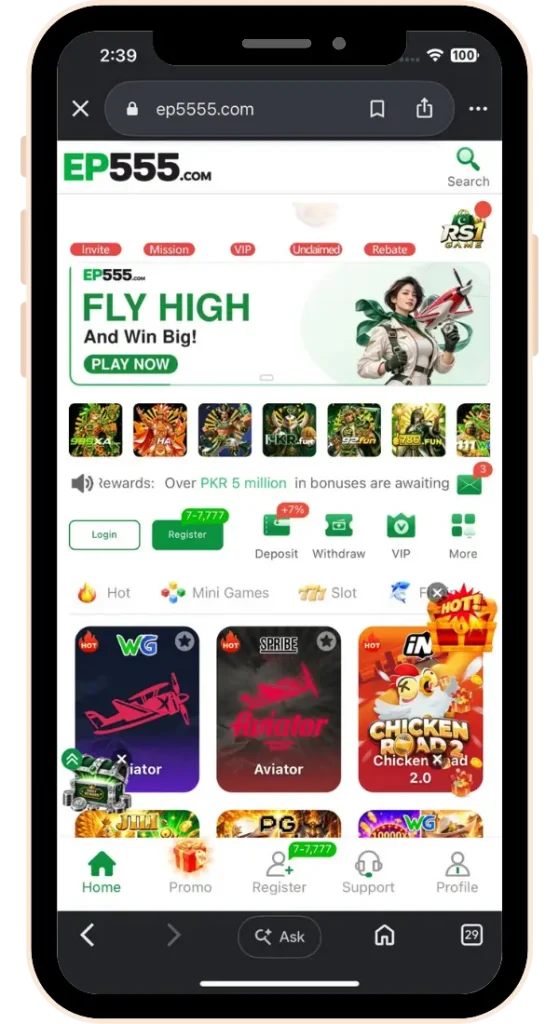
People researching EP555 Game APK should first look for clear information about the developer, application version, privacy policy, and supported Android devices. If these details are unavailable or cannot be verified, downloading the file may not be a sensible choice.
It is also useful to remember that an application’s advertised functions may not match the features actually available. Users should check the application itself and its terms rather than relying entirely on promotional descriptions.
Why Do Users Look for Android Gaming Applications?
Smartphones have become a common way to access digital entertainment. Many users prefer mobile applications because they can open them directly from their devices without needing a desktop computer.
Several considerations influence how people choose a gaming application.
Convenient Device Access
A mobile application may provide a direct way to open a service from an Android device. However, the quality of the experience depends on the application’s design and compatibility.
Simple Navigation
A well-organised application can help users locate its different sections. Clear menus and readable instructions are particularly useful for people who are new to a platform.
Flexible Entertainment
Some mobile gaming services offer different types of activities. Users should check the actual selection rather than assuming that every advertised category is available.
Account Management
Online platforms may include account-related sections for personal details and settings. Before creating an account, users should understand what information is requested and how it may be used.
Device Compatibility
Not every APK works on every Android phone. Operating system versions, hardware requirements, and application updates can influence whether an installation runs properly.
Main EP555 Game APK Details to Investigate
Before installing EP555 Game APK, users should review the application’s basic information. The following points provide a useful checklist for evaluating an unfamiliar Android package.
Application Identity
Check the application’s displayed name and developer information. If the website does not clearly identify who publishes the application, treat that as a reason to be cautious.
APK Version Information
A download page may display a version number and release information. Compare these details with reliable information from the application provider, if available. A page calling a file the latest version is not proof that it is authentic.
Android Compatibility
Review the minimum Android version and any device requirements provided by the developer. An incompatible file may fail to install or perform poorly.
Permission Requirements
Android applications may request access to certain device functions. Review each permission and consider whether it is necessary for the application’s stated purpose.
Privacy Information
A trustworthy service should provide understandable information about collecting, using, and protecting personal data. Avoid sharing sensitive details when the privacy policy is missing or unclear.
Support Availability
Check whether the provider offers a genuine support channel and clear instructions for handling technical problems. Do not rely on contact details from suspicious advertisements.
How to Download EP555 Game APK Carefully
If a genuine EP555 Game APK file is made available by a verifiable provider, Android users should take precautions before downloading it. APK files from unknown websites may contain harmful code or request unnecessary access to device information.
Use the following general process as a safety checklist:
- Search for reliable information about the application provider.
- Confirm that the download page is connected with the genuine service.
- Review the application’s name and version details.
- Check the Android compatibility information.
- Read the privacy policy and available user terms.
- Download the file only if its source can be trusted.
- Allow the download to finish completely.
- Check the file with suitable mobile security software.
- Review Android’s installation warning before proceeding.
- Inspect the permissions requested by the application.
- Stop the installation if anything appears unrelated or suspicious.
- Keep your device’s security protections enabled.
Do not download an APK simply because a website promises free rewards, guaranteed earnings, or special access. Such statements do not establish that a file is genuine.
Installing EP555 Game APK on an Android Phone
Manual APK installation can involve additional steps compared with installing an application through a recognized app store. Android settings may also differ between phone manufacturers and operating-system versions.
If you have verified that an APK is authentic and suitable for your device, the general installation process may look like this:
- Locate the downloaded file in your phone’s file manager.
- Check the file name and available version information.
- Open the file only after verifying its source.
- Review the installation message shown by Android.
- If Android requests permission to install an unknown application, consider the security risk before changing the setting.
- Do not proceed if the file requests unusual access.
- Follow the device’s installation instructions.
- Wait for Android to complete the installation.
- Review the application permissions before opening it.
- Remove the application if it behaves unexpectedly.
The option to install unknown applications can increase security risks when used carelessly. Avoid leaving unnecessary installation permissions enabled after completing a legitimate installation.
Exploring the Possible App Experience
The exact features of EP555 Game APK have not been independently confirmed. However, users researching a mobile gaming application can evaluate its available sections by looking at several common areas.
Home Screen Layout
The home screen is usually the first area users see after opening an application. Check whether the layout is understandable and whether important information is presented clearly.
Game Selection Area
Some gaming applications arrange activities into different sections. If EP555 provides a game selection page, read the rules for each activity before participating.
User Account Section
An account area may contain profile details and other personal settings. Avoid entering information that is not reasonably required for the service.
Notifications and Announcements
Some applications display updates, promotional messages, or service notices. Read these messages carefully and verify important announcements through reliable sources.
Help and Support Information
A support section may provide instructions for common issues. Check whether its contact details and guidance appear genuine before sharing private information.
Creating an Account Through a Verified Platform
Some online applications require users to register before accessing account-related features. If EP555 provides a genuine registration facility, the actual instructions displayed by the service should be followed.
A general registration procedure may include:
- Open the verified application or website.
- Find the account registration section.
- Enter the requested information.
- Create a strong password.
- Confirm your password if required.
- Review the platform’s terms and privacy policy.
- Complete any legitimate verification step.
- Submit the registration details.
- Follow the confirmation instructions.
- Store your login information securely.
Do not create an account if the service requests unnecessary personal or financial information. Check its ownership and privacy practices first.
EP555 Game APK Login and Account Access
Once an account has been created, a login facility may be used to access it again. The actual EP555 login requirements have not been independently verified, but a typical online account sign-in process may involve these steps:
- Open the verified application or website.
- Locate the sign-in page.
- Enter the registered username or mobile number, if requested.
- Type the correct password.
- Check the information before submitting it.
- Complete any legitimate security verification.
- Select the login option.
- Wait for the platform to process the request.
- Review the account page after successful access.
If login details are not accepted, check for typing errors before trying again. Never enter your password through a link received from an unknown person.
Understanding Application Updates and New Versions
Application updates may be released to change features, fix technical problems, or improve compatibility. However, users should not install every file advertised as a new EP555 Game APK version without checking its source.
Before updating an application, consider these points:
- Verify the identity of the provider.
- Check the displayed version information.
- Review the update notes, if available.
- Confirm that the file supports your Android device.
- Read the permissions requested by the updated version.
- Keep a record of important account information.
- Avoid files distributed through suspicious messages.
- Do not ignore security warnings during installation.
A newer version number does not automatically mean that a file is safer or better. Authenticity should remain the first priority.
Common APK Installation Problems and Solutions
Android users may occasionally experience technical issues when installing an APK. Understanding the possible reasons can make troubleshooting easier.
Installation Blocked by Android
Android may prevent an installation because the file comes from an unrecognized source. Do not bypass this warning unless you have independently verified the file and understand the security implications.
Application Not Compatible
An APK may require a newer Android version or different device specifications. Check the application’s requirements before attempting another installation.
File Cannot Be Opened
An incomplete download or damaged package may prevent Android from reading the file. Delete suspicious or incomplete files and use only a verified source.
Application Closes Unexpectedly
Unexpected closing can be caused by software conflicts, limited device resources, or compatibility problems. Stop using the application if it behaves unusually.
Update Installation Failure
An update may fail because of package differences, device restrictions, or an unreliable file. Do not download replacement files from random websites.
Excessive Permission Requests
If an application requests access unrelated to its stated functions, reconsider installing it. Unnecessary permissions can create privacy concerns.
Advantages and Disadvantages of APK-Based Applications
Installing applications through APK packages can offer flexibility, but it also requires additional care.
Possible Advantages
- APK files provide an alternative Android installation format.
- Users may access application versions distributed outside app stores.
- Installation can be completed directly on a compatible device.
- A mobile application may offer convenient access to its supported functions.
- Users can review application permissions before proceeding.
- Version details may help users identify the package they are considering.
Possible Disadvantages
- Files from unknown sources may contain harmful software.
- Compatibility problems can affect installation.
- Manual updates require additional attention.
- Unverified applications may collect unnecessary information.
- Fake download pages can imitate genuine services.
- Technical support may be difficult to verify.
- Advertised features may not match the actual application.
Payment and Promotional Claims: What Should You Verify?
Some online gaming platforms advertise bonuses, deposits, referral benefits, or withdrawals. However, these features have not been independently confirmed for EP555 Game APK.
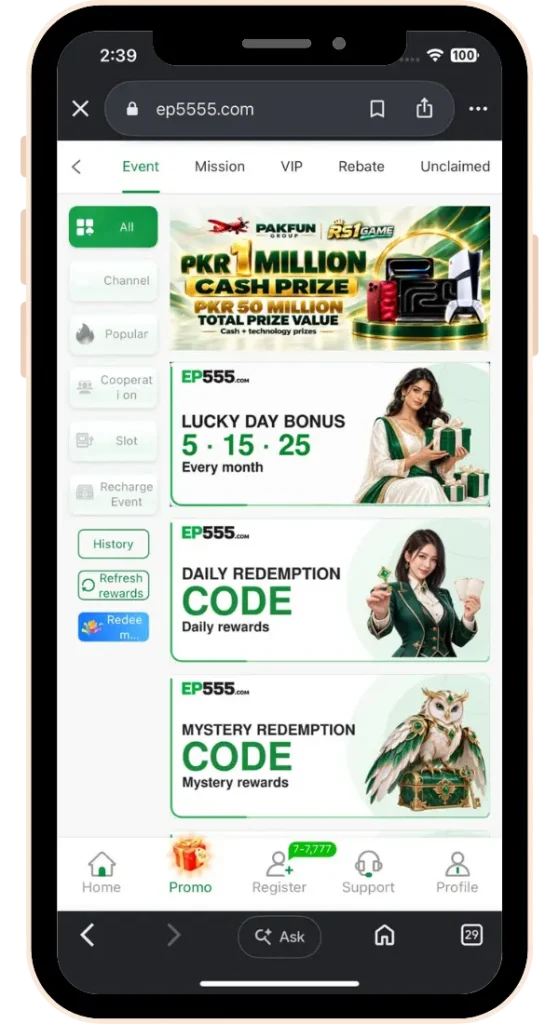
Before making any financial decision, review the service’s current terms and verify the payment information. Check whether the provider explains transaction limits, fees, withdrawal conditions, and identity verification requirements.
People in Pakistan may recognize payment services such as Easypaisa, JazzCash, and bank transfers, but their availability should never be assumed. Confirm support through reliable platform information before sending money.
Be especially careful with promotional messages that promise guaranteed returns or unusually high rewards. Gaming outcomes are not guaranteed, and some activities may involve financial losses.
Protecting Your Android Device and Personal Information
Installing an application is not only about making it work. Users should also understand how it interacts with their device and personal information.
Keep Android Updated
Operating-system updates can include important security improvements. Install updates provided through your device’s legitimate settings.
Use a Screen Lock
A PIN, password, or supported biometric lock can help prevent unauthorized access to your phone.
Review App Permissions
Check which device features an application can access. Remove permissions that are unnecessary where Android allows you to do so.
Avoid Untrusted Download Links
Do not install files sent through unknown messaging accounts or suspicious advertisements.
Protect Your Login Credentials
Use a unique password and never share account verification codes with another person.
Monitor Unusual Device Activity
Pay attention to unexpected advertisements, unknown applications, or unusual device behaviour after installing software. Remove an application if you have reason to believe it is unsafe.
Responsible Use and Legal Awareness in Pakistan
Online entertainment should always be approached with care, particularly when a platform includes financial activities. Users should understand the difference between ordinary entertainment and services involving deposits, wagering, or cash rewards.
The legal position of gaming services depends on their activities and the laws that apply in the user’s location. People in Pakistan should consult relevant local regulations and official guidance before participating in activities involving money.
It is also important to establish personal limits. Do not borrow money to participate, chase previous losses, or treat gaming as a dependable income source. If an activity begins affecting daily responsibilities or financial well-being, take a break.
Practical Checklist Before Using EP555 Game APK
Before deciding whether to install or access an unfamiliar application, review this checklist:
- The application provider can be identified.
- The download source has been independently checked.
- The APK version information is understandable.
- Android compatibility requirements are available.
- The privacy policy can be reviewed.
- Requested permissions appear relevant.
- Account terms are clear.
- Support information can be verified.
- Payment conditions have been checked, if applicable.
- No unrealistic earning promises are being relied upon.
If several important details cannot be verified, it is safer to avoid installing the application.
Final Overview of EP555 Game APK
EP555 Game APK is a search term that may interest Android users researching mobile gaming applications and online entertainment services. Understanding the APK format, installation requirements, application permissions, and account access process can help readers evaluate an unfamiliar platform more carefully.
This guide has focused on the practical side of Android application use, from checking a download source to understanding updates and troubleshooting common installation problems. It has also explained why privacy, device security, and financial awareness should remain important considerations.
The actual features, developer information, and availability of EP555 Game APK should be verified through reliable sources. Users should not rely on unconfirmed claims about rewards, payment methods, or guaranteed earnings.
Before installing any application, make sure you understand what it does and what information it may access. A careful approach can help protect your Android device and support more informed decisions about online entertainment.
Download links
How to install EP555 Game APK Download 2026 APK?
1. Tap the downloaded EP555 Game APK Download 2026 APK file.
2. Touch install.
3. Follow the steps on the screen.