
777CX Game APK Download
Just Now
16.57MB
v3.7.9.2
Android/iOS
88435

Description
Mobile gaming has become a popular form of entertainment in Pakistan. Many users now search for Android games and online gaming platforms that they can access through their smartphones. Among these searches, 777CX Game is a term that attracts attention.
People looking for the 777CX game may want to learn about its features, application, registration process, login options, and available gaming categories. However, different apps and websites use similar 77CX branding. Therefore, users should identify the exact platform before downloading an application or creating an account.
In this guide, we explain the important information associated with 77CX Game. We also discuss APK installation precautions, account safety, possible platform differences, and responsible gaming habits. This information can help Pakistani users make more informed decisions.
What Is 777CX Game?
777CX Game is a title used by different mobile gaming applications and online gaming websites. Some app listings describe this game as a casual entertainment game with simple gameplay, colourful graphics, and an easy-to-use interface. Also visit KA777.
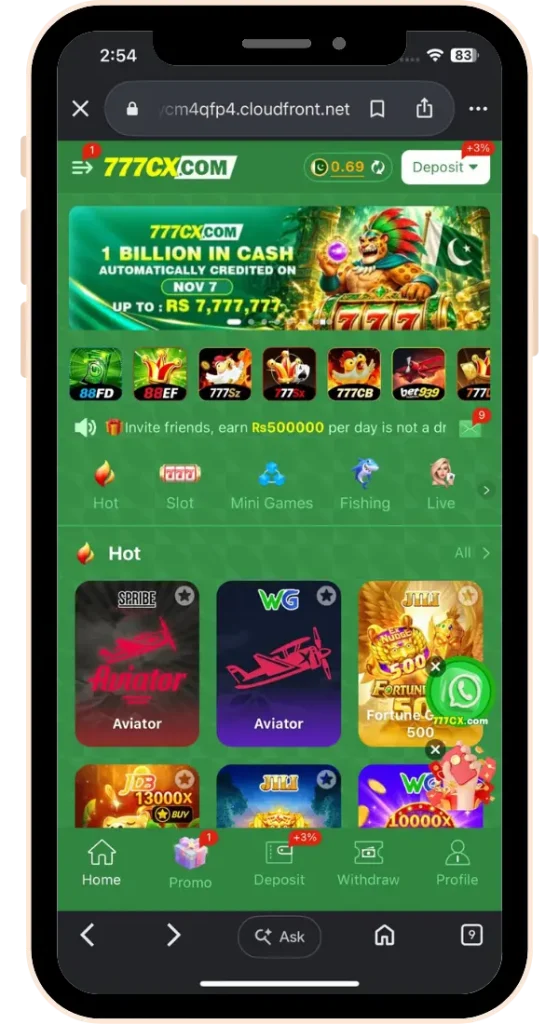
On the other hand, certain third-party websites promote a separate 777CX platform with casino-style games and real-money activities. These services should not automatically be treated as the same application.
This difference matters because each app may have a different developer, purpose, privacy policy, and set of features. As a result, users should check the exact application and website before trusting any description.
Why Do Pakistani Users Search for 777CX Game?
There are several reasons why people may search for this gaming platform:
- They want to find an Android application.
- They are looking for information about 777CX Game APK.
- They want to understand the registration and login process.
- They have seen promotional content about its gaming options.
- They want to check whether the platform is suitable for their device.
- They need information about its safety and privacy practices.
However, search popularity does not prove that a platform is official, secure, or suitable for every user. Therefore, checking reliable information should always come first.
Main Features Associated with 777CX Game
Different services using the 777CX branding advertise different features. Some listings describe casual entertainment, while other websites promote online gaming categories. The exact features depend on which application or service a user is viewing.
1. Mobile-Friendly Interface
A simple interface can make a gaming application easier to understand. Clear menus, readable text, and organized sections help users navigate an app without unnecessary confusion.
However, users should check the actual application before assuming that every version offers the same design or performance.
2. Casual Gaming Experience
Some 777CX app listings describe casual arcade-style entertainment. These types of games generally focus on simple controls and short playing sessions.
Players who prefer casual games may find this style easier to understand than applications with complicated menus or controls.
3. Different Gaming Categories
Certain websites using the 777CX branding advertise multiple gaming categories, including card-style games, slots, and other online entertainment formats.
Nevertheless, promotional descriptions do not confirm that every advertised category is available in every 777CX application. Always review the actual game catalogue and its terms before using a service.
4. Account Access Options
Some online gaming services require users to create an account before accessing certain features. An account system may include login details, profile settings, and account recovery options.
Before registering, users should identify the platform operator and read its privacy policy. Never provide personal information to an unknown website.
5. Application Updates
Developers sometimes release updates to improve performance, fix technical issues, or change application features.
However, users should not install an update simply because a third-party website labels it as the latest version. Instead, compare the application title, developer information, version details, and download source.
777CX Game APK Complete Download Information
The 777CX Game download is commonly relevant to Android users who want to understand how APK installation works.
APK stands for Android Package Kit. It is a file format that Android uses to distribute and install applications. Some applications are available through Google Play, while others may be distributed through separate websites.
However, downloading an APK from an unknown source can create security risks.
How to Check a 777CX APK Before Downloading
Before installing any file associated with 777CX Game, follow these precautions:
- Check the developer: Confirm who created and published the application.
- Verify the source: Prefer a trusted application store or a developer-controlled website.
- Review the app title: Make sure the application matches the service you intend to access.
- Check version information: Compare the version displayed on the download page with the actual file.
- Review permissions: Be careful if an ordinary game requests access to contacts, SMS, or other unnecessary information.
- Scan the file: Use a reputable mobile security tool before installation.
- Read the privacy policy: Understand how the application handles personal information.
Most importantly, a website using the 777CX branding does not automatically become an official download source.
How to Install an APK on Android
If you have independently verified that an APK is genuine and safe to install, the general Android installation process works as follows:
- Download the APK from the verified source.
- Open your phone’s Downloads folder.
- Select the downloaded application file.
- Follow the installation instructions displayed by Android.
- Review any security warnings before continuing.
- Open the application only if its identity matches the service you intended to install.
If Android displays a security warning, do not ignore it just to complete the installation. Stop and investigate the file first.
777CX Game Registration Steps
Some online services using the 777CX branding advertise account registration. However, registration requirements may differ between applications and websites.
Before creating an account, confirm that you have reached the correct platform. Then read its account terms and privacy information.
General Account Registration Steps
If a verified service provides a registration option, the general process may include these steps:
- Open the verified application or website.
- Find the registration option.
- Review the platform’s terms and privacy policy.
- Enter only the information that the service genuinely requires.
- Create a strong and unique password if password registration is available.
- Complete any legitimate verification process.
- Keep your account details private.
Do not register through links sent by unknown people on WhatsApp, SMS, or social media.
Important Things to Check Before 777CX Game Registration
A responsible user should check the following details:
- Who operates the platform?
- What information does registration collect?
- Does the service explain its privacy practices?
- Is there a clear account recovery process?
- Can users contact a verifiable support service?
- Are the platform’s terms easy to understand?
If these details are missing, avoid sharing sensitive personal information.
777CX Game Login Process
The 777CX Login keyword is relevant to users who already have an account on a service using this branding.
However, different websites may use similar designs and logos. Therefore, users should never assume that every 777CX login page belongs to the same operator.
General Login Process
If you have already registered with a verified platform, follow its official login instructions.
Usually, an account-based service may ask you to:
- Open the verified application or website.
- Select the Login option.
- Enter your registered login details.
- Complete any required verification.
- Access your account if the information is correct.
The exact login method depends on the service.
What to Do If Login Does Not Work
Sometimes users experience login problems because of incorrect details, internet interruptions, or temporary technical issues.
Try these basic steps:
Check Your Login Details: Make sure you entered the correct username, phone number, or password.
Check Your Internet: Switch between Wi-Fi and mobile data to identify connection problems.
Update the Application: If a verified update is available, review it before installing.
Use Account Recovery: Follow the recovery process provided by the verified service.
Contact Support: Use a support channel listed on the platform’s verified website or application.
Never share your password or one-time verification code with anyone claiming to fix your account.
777CX Game and Payment-Related Claims in Pakistan
Some third-party websites associate 777CX branding with deposits, withdrawals, bonuses, and local payment services. However, these claims are not enough to confirm that a particular application supports those services.
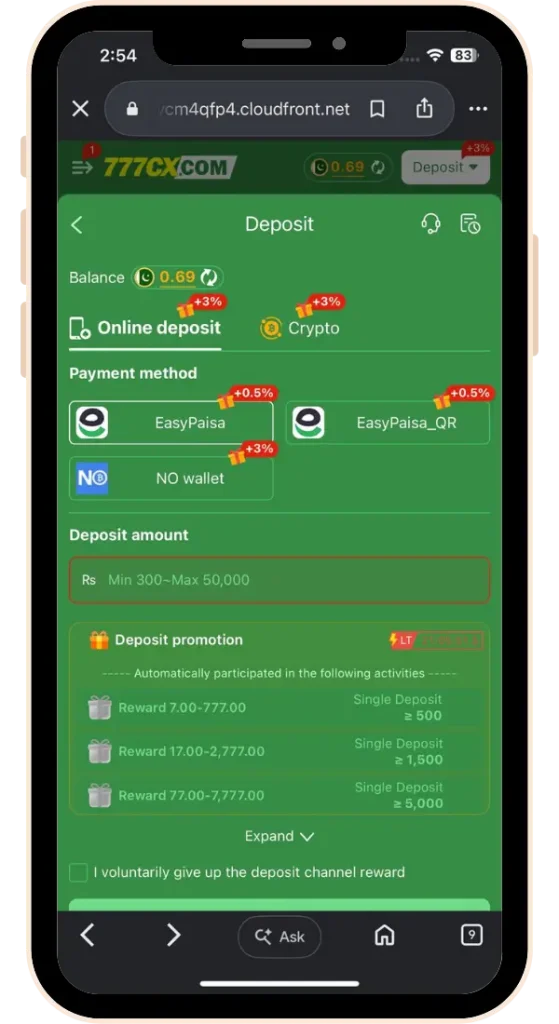
Pakistani users should be especially careful before making any financial transaction.
Check 777CX Game Payment Information Carefully
If a platform displays payment options, review the following information before taking action:
- Confirm the payment provider and recipient details.
- Read the minimum and maximum transaction limits.
- Check any processing fees.
- Understand the withdrawal conditions.
- Keep transaction receipts.
- Never send money to a personal account based only on a message from an unknown agent.
JazzCash and Easypaisa are familiar payment services in Pakistan, but that does not mean every platform supports them or that a transaction through a particular website is trustworthy.
Do Not Trust Guaranteed Earning Claims
Some promotional pages use phrases such as easy earning, daily income, or guaranteed rewards. Users should treat these statements carefully.
Online games involving betting or financial risk can lead to losses. No advertisement can guarantee a winning result or regular income.
Therefore, never use money needed for food, bills, education, rent, or other essential expenses for gaming activities.
Is 777CX Game Safe to Use?
The safety of 777CX Game depends on the exact application or website. Since different services use similar branding, users should not judge their safety based only on a logo or promotional description.
Before using any version, review its developer details, download source, privacy policy, permissions, and account terms.
Signs of a More Trustworthy Application
A responsible user should look for:
- Clear developer or operator information.
- A verifiable application distribution source.
- A readable privacy policy.
- Reasonable application permissions.
- Clear terms of service.
- Working and verifiable support information.
- Transparent information about any financial activity.
Even when these details are available, they do not guarantee that an application is completely risk-free.
Warning Signs to Avoid
Stop before installing or using an application if you notice:
- Unusually large earning promises.
- Unknown download links.
- Requests for unnecessary personal information.
- Pressure to deposit money quickly.
- Fake-looking login pages.
- Requests to share OTPs or passwords.
- Unclear withdrawal or account conditions.
These warning signs can help users avoid suspicious applications and websites.
Advantages and Limitations of 777CX Game
Different versions of 777CX may offer different experiences. Therefore, users should evaluate the actual application rather than relying on a general description.
Possible Advantages
Depending on the specific version, users may find:
- Simple mobile navigation.
- Casual entertainment options.
- Short gaming sessions.
- An interface designed for smartphone users.
- Different gaming formats on some advertised services.
Important Limitations
Users should also consider these concerns:
- Several unrelated services use similar branding.
- The exact developer may not be clear on every website.
- APK information can differ between download pages.
- Some promotional claims may lack independent confirmation.
- Real-money gaming can involve financial losses.
- Privacy and payment conditions require careful review.
As a result, users should check the identity and terms of a service before making a decision.
Common Problems and Their General Solutions
Like other mobile applications, gaming apps can sometimes experience technical problems. The following steps may help users understand common issues.
Application Not Opening
First, restart your phone and check whether your Android software is updated. Also, confirm that the application is compatible with your device.
If the problem continues, avoid downloading replacement APK files from random websites.
Slow Loading
A weak internet connection can affect application performance. Switch to a stable network and close unnecessary background applications.
Also, check whether your phone has enough free storage.
Account Access Problems
If you cannot access an account, review the login information and use the verified recovery option.
Do not trust strangers who offer to unlock accounts in exchange for money or private information.
Unexpected Application Behaviour
If an application displays suspicious advertisements, requests unusual permissions, or redirects you to unrelated websites, stop using it.
Review its permissions and consider uninstalling it if you cannot verify its purpose.
Tips for a Better and More Responsible Gaming Experience
Mobile gaming should remain an entertainment activity. Therefore, users should develop healthy habits before spending time on any gaming platform.
Manage Your Playing Time
Set a reasonable time limit for gaming. Take regular breaks and avoid allowing mobile games to interfere with your daily responsibilities.
Protect Your Personal Information
Use a unique password and keep verification codes private. Also, avoid entering personal information on websites with unclear identities.
Avoid Financial Pressure
If a service involves real-money activities, understand the risks before participating. Never borrow money or use essential funds for gaming.
Keep Your Device Updated
Install Android security updates and review application permissions regularly. These simple habits can improve your overall device security.
Final Thoughts on 777CX Game
777CX Game is a title that Pakistani users may encounter while searching for mobile entertainment, Android applications, and online gaming services. However, several unrelated apps and websites use similar branding, so identifying the correct platform is an important first step.
Before downloading an APK or creating an account, check the developer, application source, privacy policy, and terms of service. Similarly, review any payment-related information carefully instead of trusting promotional claims.
Most importantly, protect your personal information, avoid suspicious download links, and remember that real-money gaming can involve financial losses. A careful approach will help you make a more informed decision about any service using the 777CX branding.
Frequently Asked Questions
Some websites promote 777CX services to Pakistani users. However, availability and features depend on the specific application or website.
Use a verified application store or a developer-controlled download source. Do not install APK files from unknown websites or links shared by strangers.
If you find a verified service, follow its registration instructions and read its terms first. Avoid providing unnecessary personal information.
Open the verified application or website and follow its account access instructions. Always check the website address before entering your login details.
Some third-party websites advertise real-money gaming under the 777CX branding. However, those claims should not be treated as proof of verified rewards or reliable payouts.
Some promotional websites mention local payment services, but support is not confirmed for every application using the 777CX branding.
Download links
How to install 777CX Game APK Download APK?
1. Tap the downloaded 777CX Game APK Download APK file.
2. Touch install.
3. Follow the steps on the screen.