
555JC Game Download Guide For Free
Just Today
13.45MB
v4.3.5
Android/iOS
23865

Description
Pakistani mobile users often look for new Android gaming applications and online entertainment platforms. They usually want to know how an application works, whether it supports their phone and what information they should examine before installing it. 555JC Game is one of the names that appears in searches for mobile gaming platforms.
Users searching for 555JC Game may want details about its application, gaming options, registration process, login information and payment facilities. However, online descriptions do not always provide consistent or independently verified information. Moreover, a download page may display outdated details or use a similar name to attract visitors.
This guide explains how to research 55JC Game before using it. It covers APK installation, account security, possible platform features, local payment checks and common Android problems in simple English for Pakistani readers. The exact developer, official status and current application specifications for 555JC should still be verified independently, so do not rely on an advertisement or an unfamiliar download page as proof that an application is genuine.
Exploring 555JC Game
555JC Game is a name linked with online searches for mobile gaming applications. Some third-party descriptions present it as an Android-orientated gaming platform with account-related options and different entertainment sections. In many cases, people search this keyword because they want a single place to understand the app, its access method and the basic risks involved. Kindly visit SQ777.

However, check a platform’s real features through reliable information from its publisher. A website may describe an application as offering multiple games, promotional activities or wallet services, but those statements do not automatically prove that the features are available. Therefore, treat every promotional claim as information that still needs confirmation inside the live application or through the publisher’s own documentation.
Examining the 555JC Game Service
Before using an application, identify the service behind it. Look for the publisher’s name, official website, support details and privacy policy. These details help you understand who controls the application and how user data may be handled.
You should also compare the application name and branding across its website and download page. If the information does not match, pause before installing anything. In addition, review whether the page clearly explains account rules, device support and contact options. A clearer service description usually reduces confusion and helps users avoid random third-party files.
Is 555JC Game Built for Android?
Third-party online listings describe an Android APK associated with the 555JC name. However, the exact official release and current technical specifications have not been independently established. Because of that, Android availability should be confirmed through consistent file details and publisher information.
Therefore, users should verify the publisher and file information before installing an APK. Do not assume that every file labelled “555JC Game” belongs to the same application. Different pages may use similar titles while offering different packages, so careful comparison remains important.
555JC Game APK Access
An APK file allows an Android phone to install an application package. This method is sometimes used when an app is distributed outside a recognised app store. For many Pakistani users, APK access becomes the first practical step after searching for 555JC game.
Although APK installation can be straightforward, users should pay attention to the download source. An unfamiliar file can create security and privacy risks. In addition, incomplete files, outdated packages and modified copies can cause installation failure or unexpected behaviour on the phone.
Confirm Who Provides the File
First, identify who controls the website offering the APK. Look for clear publisher information and consistent contact details. Avoid pages that provide no information about the organisation behind the application.
A website using the 555JC name does not necessarily have permission to distribute the genuine application. Moreover, pages with repeated redirects, copied text or unclear ownership deserve extra caution before any download begins.
Examine Version and Package Size
Some download pages display a version number, file size and update date. Compare these details with the publisher’s current information whenever possible. This helps reduce the chance of installing an outdated or mismatched package.
Do not assume that a page showing “latest version” is accurate. File specifications can change, and different websites may publish conflicting details. Therefore, review the displayed information carefully before saving the APK to your phone.
Confirm Android Compatibility
Check the minimum Android requirement and available storage before installation. If the publisher does not explain device compatibility, be careful about downloading the file. Phones with limited storage or older system versions may face installation errors.
In addition, close unnecessary apps and keep a stable internet connection during the download. These simple steps support a cleaner installation process and reduce incomplete file transfers.
Avoid Altered Packages
Avoid APK files advertised as hacked, unlocked or specially modified. Such files may contain unwanted software or change the application’s behaviour. They may also request unusual permissions that increase privacy risk.
Do not install an unfamiliar package simply because it promises extra features or rewards. A safer approach is to use only a source you can reasonably trust and to stop if the file information looks inconsistent.
Setting Up 555JC Game APK on Android
If you have found a file from a source you have independently verified, follow these general steps carefully. This process helps you stay in control during installation and reduces common mistakes.
- Download the APK from the verified publisher.
- Open the Downloads folder on your Android phone.
- Select the installation file.
- Review the security warning displayed by Android.
- Allow installation from that source only if you trust it.
- Check the permissions requested by the application.
- Continue only if the file and publisher information appear legitimate.
- Open the application after installation.
- Disable the unknown-app installation permission when you finish.
The steps may look different on Samsung, Vivo, Oppo, Xiaomi, Tecno and Infinix phones. If Android warns that the file may be harmful, investigate the warning instead of ignoring it. After setup, review the first screens of the app before creating an account or entering personal details.
A Closer Look To 555JC Game
Online descriptions may mention several features associated with 555JC Game. However, the current availability of these functions has not been independently confirmed. Use the following sections as a checklist when examining the actual application, and confirm each point inside the live version.
On-Phone Gaming Experience
Check whether the application provides a clear interface and understandable game instructions. Users should be able to identify the available sections without having to follow unclear links or messages from unknown agents. A cleaner layout usually makes browsing safer and easier for beginners.
In addition, test basic navigation after installation. If buttons, menus or pages behave in a confusing way, pause before sharing sensitive information or making any payment-related decision.
Multiple Entertainment Sections
Some descriptions of mobile gaming platforms mention multiple game formats. Confirm the exact categories available on 55JC inside the verified application. Do not rely only on screenshots or repeated marketing text from third-party pages.
Read the rules for each activity. If a game involves chance or real-money participation, understand the financial risks before taking part. Moreover, previous results should never be treated as a guarantee of future outcomes.
Profile and Account Controls
An account section may provide access to profile information and security settings if the application supports these functions. These tools matter because they help users manage personal details and review basic account activity.
Check whether users can update their details, review account activity and access a genuine help channel. Never share your login information with another person. Also, use a unique password that is different from your email and mobile wallet accounts.
Balance Area and Transaction History
Some third-party descriptions associate gaming applications with wallet facilities. However, the existence of a wallet or transaction section on 55JC has not been independently confirmed. Users should therefore verify this section directly inside the application.
If such a section appears, review its terms and payment instructions carefully. Check transaction records and any applicable fees before making a decision. Keeping personal records of deposits and withdrawals can also help if a payment issue appears later.
Campaign and Offer Details
Gaming platforms may display promotional messages or limited-time offers. These messages can include separate eligibility requirements and restrictions. Because of that, promotional headlines should never be read in isolation.
Read the full terms before participating. A bonus should not be treated as guaranteed cash or a promise of winnings. In addition, expiry dates and withdrawal conditions can significantly change the practical value of any reward.
Layout and Overall Usability
Check whether the application uses clear menus and readable instructions. Avoid entering personal information if the interface contains suspicious pop-ups, misleading buttons or unexpected redirects. A confusing interface is a valid reason to stop and reassess the source.
Furthermore, test whether important sections such as account settings, support and payment pages are easy to find. Clear navigation improves the overall user experience and reduces avoidable mistakes.
Support and Assistance Details
Look for a support channel that clearly belongs to the service. Be cautious if an unofficial representative asks for your password, OTP, PIN or payment details. Genuine support should not require private banking credentials to explain basic account functions.
If support information is missing, unclear or only available through random private messages, treat that as a warning sign. Reliable contact details help users resolve issues more safely.
Opening an Account on 55 JC Game Online
The exact 555 JC registration process has not been independently confirmed. If the verified platform offers an account creation option, follow its published instructions. Reading the requirements first helps you avoid entering unnecessary personal details.
A general registration process may include the following steps:
- Open the verified application or website.
- Find the Register or Sign Up option.
- Review the account eligibility rules.
- Enter the information requested by the service.
- Complete a legitimate verification step if required.
- Create a strong password that you do not use elsewhere.
- Read the privacy policy and terms.
- Check your information before submitting the form.
Do not create an account using someone else’s identity. Also, avoid sharing verification codes with people who claim to provide registration support. After registration, review your profile settings before moving toward any deposit activity.
Entering Your 555JC Game Account
If the application provides a login facility, use the verified application or website. Avoid login links received through unknown messages, because those pages may attempt to collect account details.
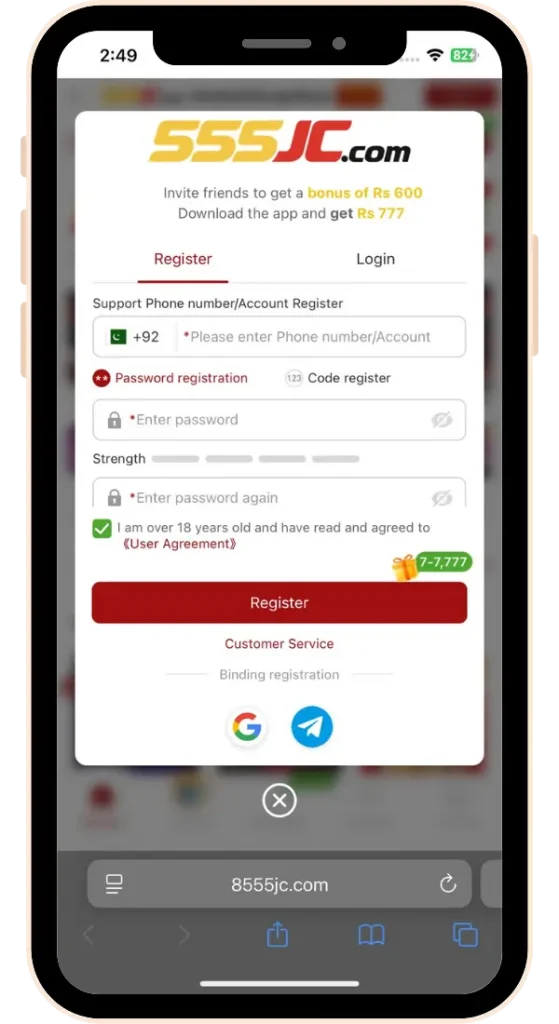
Standard Sign-In Flow
- Open the platform you have verified.
- Select the Login or Sign In option.
- Enter your registered account details.
- Check your information carefully.
- Complete any additional verification.
- Review the account page after signing in.
These are common account access steps, not confirmation of a specific 55JC login system. After a successful sign-in, explore the menus first and confirm that the account section looks consistent before taking further action.
Managing Sign-In Errors
If the login process fails, check your internet connection and make sure you entered the correct details. If an official password recovery feature is available, follow its instructions. Repeated failed attempts can sometimes cause temporary access delays, so enter details carefully.
Never pay an unknown person who promises to unlock your account. Do not share your password or OTP with anyone. Official recovery should happen only through the verified platform path.
555JC Game Payment Options in Pakistan
Payment information is an important consideration for Pakistani users. Local services such as JazzCash and Easypaisa are commonly used for digital transactions. Bank transfers are another familiar option.
However, their availability on 555JC game online has not been independently confirmed. A third-party website mentioning a payment service does not prove that the application supports it. Therefore, always confirm methods inside the live payment section before sending money.
How to Confirm Available Payment Methods
If the verified platform provides a wallet or payment section, check:
- The payment services listed by the platform
- The recipient’s name and account details
- Any transaction charges
- Deposit or withdrawal limits, if applicable
- Account verification conditions
- Refund and complaint procedures
- The expected processing information
Do not send money to a personal number based on an unofficial WhatsApp message. Confirm the recipient through a trusted source and keep your transaction record. These habits protect both your balance and your personal financial information.
Does 555JC Accept JazzCash?
JazzCash is a well-known mobile financial service in Pakistan. Nevertheless, its popularity does not mean that every online gaming platform accepts it. Users should look for clear listing inside the verified payment page rather than depending on repeated claims from random websites.
Check the verified 555JC login payment information before assuming that JazzCash is available. Also protect your JazzCash PIN and OTP during every transaction.
Can Users Transfer Through Easypaisa?
The same rule applies to Easypaisa. Do not describe it as a confirmed 555JC payment option unless the platform clearly lists it through a verified channel. Popularity in Pakistan does not automatically equal availability inside every application.
Never share your wallet PIN or OTP with an agent or support representative. If a withdrawal request is delayed, keep your reference and use only verified contact channels.
555JC Game Rewards and Campaign Offers
Users may encounter promotional claims while researching online gaming applications. These can include welcome messages, referral promotions or other reward-related advertisements. Promotions may look attractive, but they usually include conditions that affect practical value.

The current availability of any particular 555JC offer has not been independently confirmed. Therefore, check the actual terms before relying on a promotional message. Reading the full rules first helps users avoid confusion later.
Review Eligibility Rules
A promotion may have age, account or participation requirements. Read the complete terms rather than focusing only on the headline. Some offers apply only to new accounts, while others may require a deposit or additional activity.
Confirm Time Limits
Some offers remain available for a limited period. Confirm the start and end dates before assuming that an advertisement is current. Expired campaigns should not guide deposit decisions.
Understand Cash-Out Limits
If a promotion includes withdrawal conditions, read them carefully. Do not assume that a displayed bonus can be withdrawn immediately. Playthrough rules, game restrictions and maximum cash-out limits can all affect the final result.
Resist Deposit Pressure
Never deposit money just because a message says that an offer will expire soon. Promotional claims do not guarantee winnings or financial returns. A calm decision based on clear terms is safer than a rushed deposit.
Is 555JC Game Safe for Users in Pakistan?
Safety depends on the actual application, its publisher, the download file and the way it handles user information. The security of 555JC has not been independently verified. Because of that, users should examine practical protection steps before installation and account use.
Before installing or using any unfamiliar gaming app, consider these precautions carefully. Strong habits around device security, passwords and payments reduce avoidable risk.
Secure Your Smartphone
Keep Android updated and use its built-in security tools. Avoid installing APK files from unknown websites or messaging groups. In addition, remove temporary installation permissions after the setup is complete.
Review App Permissions
Review the permissions requested during installation. Be careful if an application asks for access to sensitive information without explaining why it needs it. Unnecessary permissions can create privacy concerns.
Keep Your Account Private
Use a strong password and do not share your OTP. Avoid signing in through links sent by strangers. Also log out from shared devices after use.
Protect Your Mobile Wallet
Never disclose your JazzCash or Easypaisa PIN. Check every transaction before confirming it and report suspicious activity to the relevant payment provider. Transaction records are useful if a dispute appears later.
Follow Local Requirements
Before participating in online betting or real-money gaming, check the applicable laws and restrictions in Pakistan. Do not assume that an application is legally authorised because a website promotes it locally. Understanding local rules is part of responsible research.
Frequent Issues and Practical Checks
| Problem | What you can check |
|---|---|
| APK installation fails | Verify the file source, Android version and storage |
| Application does not open | Restart your phone and review compatibility |
| Login is unsuccessful | Check your credentials and official recovery options |
| Download stops | Check your connection and available storage |
| Payment is not confirmed | Keep the receipt and contact the verified provider |
| App shows unusual pop-ups | Close it and investigate the source |
| App requests unexpected permissions | Review the reason before allowing access |
These are general Android troubleshooting suggestions. They are not confirmed 555JC-specific solutions. If a problem continues, stop repeating unsafe downloads from unknown mirrors and reassess the source first.
Closing Notes
The 555JC Game keyword is relevant to Pakistani users who want to learn about an Android gaming platform, its possible features and its account access process. Before installing an APK, verify the publisher and download source. Then check compatibility, permissions and privacy information.
Payment services such as JazzCash and Easypaisa should only be described as supported when the platform confirms them through a reliable source. Users should also read the terms carefully and understand the risks of real-money gaming. Research first, protect your information and avoid making financial decisions based on promotional promises.
Common Questions About 555JC Game
55JC Game is a name that appears in searches for mobile gaming applications. Verify its exact publisher, features and official status before use.
Find a download source that you can verify as belonging to the publisher. Check the application information and device requirements before installing the APK.
Third-party listings describe an Android APK associated with the name. However, users should verify the exact file and its compatibility before installation.
If the verified platform provides registration, open its sign-up section, enter the requested details and follow its published verification instructions.
Use the login option on the verified application or website, if available. Enter your registered details and follow any additional security steps.
Do not assume Easypaisa is supported. Confirm its availability through reliable platform information before sending money.
Specific current offers have not been independently verified. Review the application’s promotional terms if it displays any rewards.
Download links
How to install 555JC Game Download Guide For Free APK?
1. Tap the downloaded 555JC Game Download Guide For Free APK file.
2. Touch install.
3. Follow the steps on the screen.